
Trusted local HTTPS for WampServer. One click.
WAMP SSL Automator turns your http://myapp.test
development sites into fully trusted https:// sites in seconds —
a real local Certificate Authority your browser believes, Apache vhosts wired up, your hosts file updated,
Apache restarted, and every domain verified end-to-end. If anything goes wrong, it rolls itself back.
Free. Open source. Built for developers tired of clicking “Proceed anyway (unsafe)” twenty times a day.
Root CA key
Signature algorithm
Certificate validity
Open-source licence
The problem every WAMP developer knows
Modern web apps assume HTTPS. OAuth callbacks, secure cookies, service workers,
SameSite=None, the Payment Request API,
geolocation, camera access, HTTP/2 — half of them silently refuse to work over plain
http://. So you try to run your local sites over
HTTPS, and you hit a wall:
- A self-signed certificate earns a giant red “Your connection is not private” warning.
- One fat-fingered directive in
httpd-vhosts.confand Apache won’t start — your whole stack is down. - Forget the Windows
hostsentry and the domain doesn’t resolve at all. - OpenSSL incantations, Subject Alternative Names, Extended Key Usage flags, and the cryptic reasons Chrome rejects certificates that “look fine”.
- Get one site working, then do the whole thing again for the next project.
It’s tedious, error-prone, and one wrong move takes your local environment offline. Most developers give up and click through the warnings forever. There’s a better way.
One click does the entire job, correctly
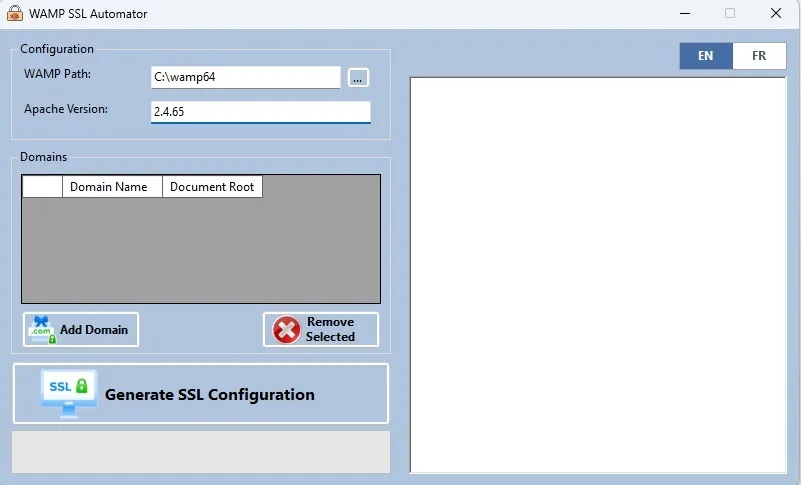
Point it at your WampServer install, type the domains you care about, and press Generate SSL Configuration. In a few seconds you get:
A local Root Certificate Authority installed into the Windows trust store — genuinely trusted certificates, not self-signed warnings.
Per-domain certificates with the exact modern profile browsers demand (SHA-256, RSA, SAN, serverAuth EKU, 825-day validity).
Your Apache vhosts merged — not overwritten — with clean :443 SSL blocks and :80 → :443 redirects.
Your Windows hosts file updated so the domains resolve to localhost.
Apache restarted automatically, after the config is validated.
Every domain fetched over HTTPS to prove the chain is trusted and the server is answering.
And the safety net you’d build yourself if you had a spare afternoon: it validates with
httpd -t before it commits, backs up your vhosts and
hosts files on every run, and rolls everything back if Apache won’t restart — including the tail of the Apache
error log so you know exactly what happened.
Why “trusted” is the whole point
Anyone can make a self-signed certificate in thirty seconds. The problem is that nobody trusts it — least of all your browser. That red warning screen isn’t a formality; it’s the browser correctly telling you the certificate has no chain of trust.
WAMP SSL Automator solves this the way the professionals do. It creates one local Root CA on your machine and installs it into the Windows certificate store, exactly once. Every per-domain certificate it issues afterward is signed by that CA. Because Windows — and therefore Edge and Chrome — trust the CA, they trust every certificate beneath it. No warnings. A real padlock. Green across the board.
The CA lives only on your machine. It never leaves, it’s never uploaded anywhere, and it only signs the development domains you explicitly ask for.
Features at a glance
Genuinely trusted certificates
A local Root CA installed into the Windows trust store. Browsers accept the certificates with no warning — not a yellow padlock, not an exception you have to click, an actual trusted connection.
Modern certificate profile
SHA-256 signatures, RSA-2048 domain keys, an RSA-4096 CA, Subject Alternative Name and Extended Key Usage extensions, and 825-day validity. Built to the spec Chrome and Edge enforce in 2026, not the loose rules of a decade ago.
Idempotent — run it as often as you like
Re-running with the same domains is completely safe. The CA is reused, still-valid certificates are reused, and the managed blocks in your hosts and vhosts files are cleanly replaced. No duplication, no drift, no mess.
Merge, never clobber
Your existing httpd-vhosts.conf is preserved verbatim — your localhost block, your comments, your other projects. Only the domains you manage with this tool get touched, inside clearly marked sections.
Backups and automatic rollback
Every run timestamps a backup of both your vhosts and hosts files. If anything fails, the tool restores them and restarts Apache on the old config. Your environment is never left broken.
End-to-end verification
After restarting Apache, the tool fetches each domain over HTTPS using the same trust chain your browser uses. You don't have to wonder if it worked — it tells you N/N OK.
Auto-detection
Finds your WAMP install (C:\wamp64 or C:\wamp) and reads your exact Apache version straight from httpd -v on startup. Almost nothing to configure.
One window, real-time log
A single desktop window. Add your domains, press the button, and watch the entire pipeline stream by line-by-line so you can see precisely what changed.
How it works
When you click Generate SSL Configuration, the tool runs this pipeline against your live WAMP install, in order — on a background thread, streaming every step to the on-screen log.
Backup
Timestamped copies of httpd-vhosts.conf and your Windows hosts file.
Root CA
Generated once (RSA-4096, SHA-256, 10-year validity) and reused forever after.
Trust
The CA is installed into LocalMachine\Root, skipped automatically if it is already there.
Certificates
One per domain, signed by your CA, with SAN + EKU and 825-day validity. Still-valid certs are reused.
Vhosts merge
Fresh :80 redirect and :443 SSL blocks appended inside a marked section; everything else left untouched.
Hosts file
127.0.0.1 yourdomain entries written atomically inside # BEGIN WampSSL / # END WampSSL markers.
Validate
httpd -t checks the config. If it fails, the tool rolls back and stops before touching the server.
Restart
The wampapache Windows service is restarted with status polling. If it will not come back, the tool rolls back.
Verify
Each domain is fetched over HTTPS to confirm the chain is trusted and Apache is serving.
English and French, one toggle
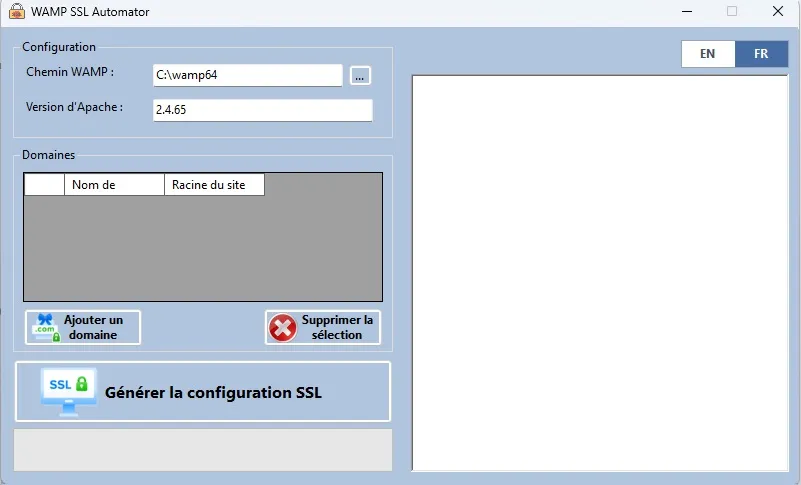
The interface ships bilingual — switch between English and French in a single click, so francophone and anglophone teams configure their stacks the same correct way.
Quick start
- 1
Download the latest release, or build from source with dotnet build -c Release.
- 2
Run as Administrator — the app self-elevates; click Yes at the UAC prompt.
- 3
Confirm your WAMP path — C:\wamp64 is filled in for you if it exists.
- 4
Add your domains — hostname plus document root, e.g. myapp.test → C:\wamp64\www\myapp\public.
- 5
Click Generate SSL Configuration and watch the log until you see Verification: N/N OK.
Open https://myapp.test. Green padlock. Done. To
remove a domain later, take it out of the list and re-run — its managed vhost block and hosts entry are cleanly removed.
Privacy, safety, and open source
Everything stays on your machine. No servers, no accounts, no telemetry, and no network calls except the HTTPS check against your own localhost. Your Root CA and private keys are generated locally and never transmitted anywhere.
It’s released under the MIT license precisely because it touches sensitive parts of your system — your certificate store and your server config. You shouldn’t have to trust a black box for that. You can read every line on GitHub, fork it, improve it, and open an issue if you hit a snag.
Frequently asked questions
Will my browser still show a warning? +
No. The certificates are signed by a Root CA installed in the Windows trust store, so Edge and Chrome trust them. (Firefox keeps its own store — flip security.enterprise_roots.enabled to true in about:config once and it will too.)
Does it overwrite my existing Apache config? +
No. It merges. Only the domains you manage with the tool are added or replaced, inside clearly marked sections. Everything else is preserved, and every run is backed up first.
What if Apache won't restart? +
The tool validates the config before restarting and rolls back automatically if the restart fails — restoring your old files and the working config, with the Apache error log included in the message.
Do I need to know OpenSSL? +
Not at all. That is the entire point. You add domains and click a button.
Is it really free? +
Yes — free and open source under the MIT license. No catch.
Can I use it for production servers? +
No. It is designed for local development. Production sites should use a public CA such as Let's Encrypt.
About the author
Peter Bamuhigire
Software architect and ICT consultant — business management systems across Africa
Peter Bamuhigire has led ERP, SaaS, and custom software programmes for organisations in Uganda, Kenya, Rwanda, DRC, Senegal, Sierra Leone, and Guinea over the last fifteen years, and runs the practice as principal architect.
Stop fighting certificate warnings
Get trusted local HTTPS on your WAMP sites in one click — and get back to building.